Create, Automate & PublishYour Content + Social Media on Autopilot
The moment new content goes live on your website or YouTube, Wordflux instantly turns it into on-brand social posts, Google Business updates, and cross-channel campaigns.
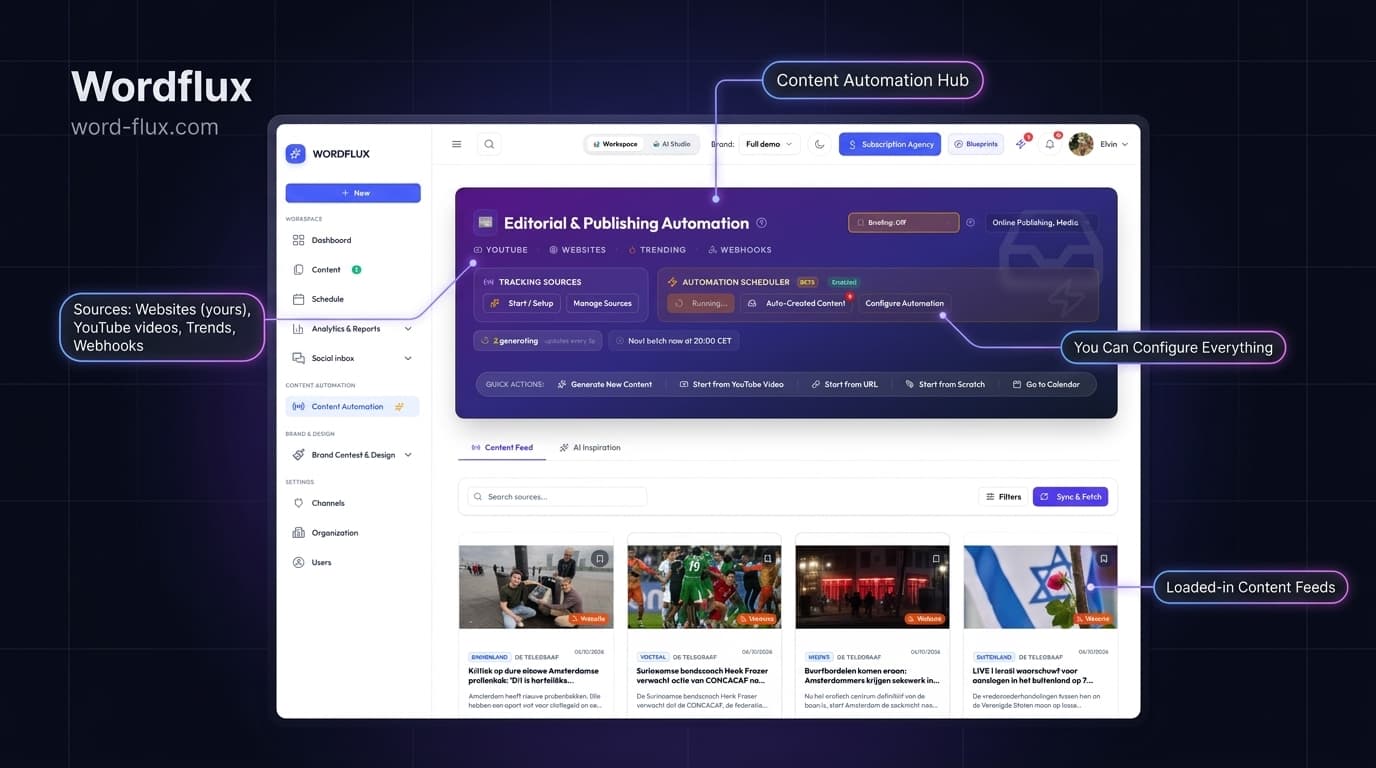
Wordflux serves as a centralized content hub, whether you are a publisher scaling your own media brands or an agency managing distribution across multiple client accounts. It operates as a true two-way engine: automatically turn website and YouTube updates into platform-ready social posts and Google Business updates, or transform videos and trends into full articles published directly back to your CMS, including WordPress, Webflow, Ghost, Shopify, and custom webhooks.
Posts can match your exact original text or be thoughtfully rewritten with AI, while images are automatically cropped for every channel with your logos and brand styling applied, eliminating manual design in Canva. Because the AI understands your specific brand voice and context, every piece sounds authentic.
Create fresh campaigns on demand, manage every brand or client from one dashboard, and share passwordless 1-click review links so stakeholders can approve drafts before anything publishes, saving teams hours of tedious work every week.
Wordflux Workflow Video Walkthroughs
- Website to Socials AI Automation (Original Text or AI)
Turn your website articles and blog posts directly into high-performing social posts with hands-free automation. Publish using your own original article text verbatim or optionally enhance and adapt with AI for each platform.
Duration: 4:44Category: Website to Socials - Create Your Content Without Leaving Your Website
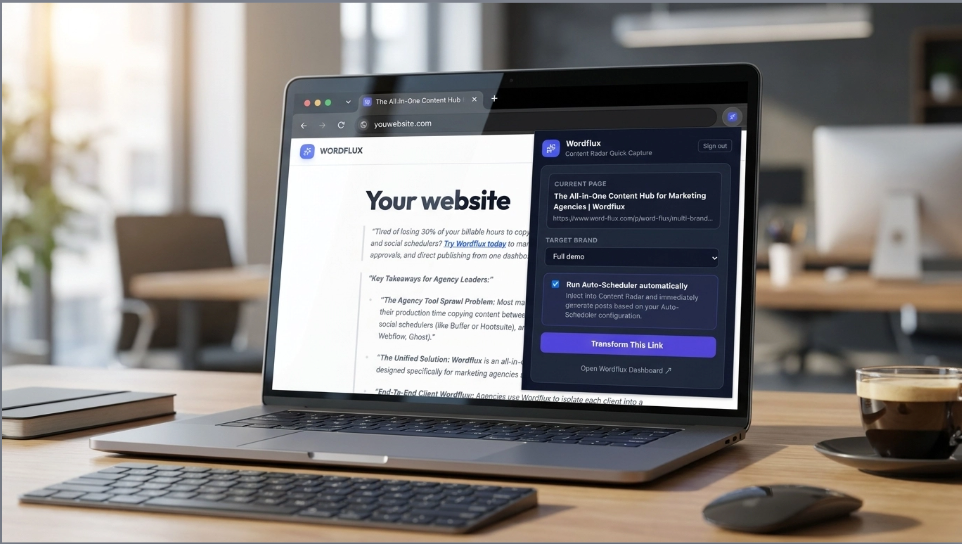
Transform any live article, blog post, or webpage directly into branded social campaigns without switching tabs. Discover how the Wordflux browser plugin detects content on your site, auto-brands imagery, polishes tone with in-page AI, and pushes directly to your 24/7 publishing queue.
Duration: 1:35Category: Browser Plugin - Create Content from Any Source (Chat, URLs & Wizard)
Generate high-impact social campaigns and blogs from any source: YouTube videos, live trending topics, DOCX files, PDFs, URLs, or custom prompts using interactive AI chat or the guided wizard.
Duration: 1:35Category: Create from Anywhere - Auto-Brand Your Photos & Images (Auto or 1-Click)
Automatically brand pictures with your logo and colors when sourcing website content, or apply custom branding with 1 click to save hours of manual design.
Duration: 1:20Category: Branded Templates - Configure Automation & Connect WordPress or Ghost
Purely configure your automated workflow and Content Radar. Set up autonomous monitoring for WordPress or Ghost, define auto-drafting rules, and schedule hands-free publishing.
Duration: 1:50Category: Setup & CMS Connect - Turn Any Source into a Blog Post & Inject into Your CMS
Repurpose YouTube videos, PDFs, or external articles into complete SEO blog posts and publish directly to your WordPress or Ghost site with 1 click.
Duration: 1:40Category: Publish to CMS - How to Schedule Your Content (24/7)
Set your publishing queue to run 24/7 across LinkedIn, X, Meta, Instagram, Pinterest, and TikTok on autopilot.
Duration: 1:45Category: Auto-Scheduler - How to Manage Multiple Brands
Organize isolated workspaces for each brand, configure individual brand voices and guidelines, manage team permissions, and switch between client brands effortlessly.
Duration: 1:45Category: Multiple Brands - Client & Team Review Flow
Share passwordless, interactive campaign review links with clients or team members to collect feedback, request line edits, and get 1-click approvals before publishing.
Duration: 1:25Category: Review Flow - YouTube to Blog & Socials
Connect entire YouTube channels to track new uploads right away, or paste individual video links to extract transcripts, create viral social posts, and generate full SEO blog articles.
Duration: 1:40Category: YouTube to Blog - Social Inbox & Analytics Reporting
Track cross-platform audience growth, export executive PDF reports, and reply to all social comments from one unified inbox.
Duration: 1:30Category: Inbox & Reports - Brainstorm & Chat (Post from Scratch)
Chat with AI to brainstorm campaign angles, write original posts from scratch, and refine your brand voice in real time.
Duration: 1:20Category: Brainstorm & Chat - How to Generate LinkedIn PDF Carousels
Convert articles, documents, or key takeaways into multi-slide, high-converting LinkedIn PDF carousels styled with your brand theme.
Duration: 1:25Category: PDF Carousels
Watch Wordflux in Action
Quick 60 to 90-second video walkthroughs with founder Elvin showing exact workflows.

Website to Socials AI Automation (Original Text or AI)
Turn your website articles and blog posts directly into high-performing social posts with hands-free automation. Publish using your own original article text verbatim or optionally enhance and adapt with AI for each platform.
Create Your Content Without Leaving Your Website
Transform any live article, blog post, or webpage directly into branded social campaigns without switching tabs. Discover how the Wordflux browser plugin detects content on your site, auto-brands imagery, polishes tone with in-page AI, and pushes directly to your 24/7 publishing queue.
Create Content from Any Source (Chat, URLs & Wizard)
Generate high-impact social campaigns and blogs from any source: YouTube videos, live trending topics, DOCX files, PDFs, URLs, or custom prompts using interactive AI chat or the guided wizard.
Auto-Brand Your Photos & Images (Auto or 1-Click)
Automatically brand pictures with your logo and colors when sourcing website content, or apply custom branding with 1 click to save hours of manual design.
Configure Automation & Connect WordPress or Ghost
Purely configure your automated workflow and Content Radar. Set up autonomous monitoring for WordPress or Ghost, define auto-drafting rules, and schedule hands-free publishing.
Turn Any Source into a Blog Post & Inject into Your CMS
Repurpose YouTube videos, PDFs, or external articles into complete SEO blog posts and publish directly to your WordPress or Ghost site with 1 click.
How to Schedule Your Content (24/7)
Set your publishing queue to run 24/7 across LinkedIn, X, Meta, Instagram, Pinterest, and TikTok on autopilot.
How to Manage Multiple Brands
Organize isolated workspaces for each brand, configure individual brand voices and guidelines, manage team permissions, and switch between client brands effortlessly.
Client & Team Review Flow
Share passwordless, interactive campaign review links with clients or team members to collect feedback, request line edits, and get 1-click approvals before publishing.
Social Inbox & Analytics Reporting
Track cross-platform audience growth, export executive PDF reports, and reply to all social comments from one unified inbox.
Brainstorm & Chat (Post from Scratch)
Chat with AI to brainstorm campaign angles, write original posts from scratch, and refine your brand voice in real time.
How to Generate LinkedIn PDF Carousels
Convert articles, documents, or key takeaways into multi-slide, high-converting LinkedIn PDF carousels styled with your brand theme.
Wordflux for Chrome & Edge: 1-Click Capture + AI Writing Assistant
Repurpose any article or YouTube video while browsing, and polish text in your brand voice directly inside LinkedIn, X, Gmail, or your CMS.
Connect all your favorite accounts & CMS platforms
Direct OAuth 2.0 partnerships with official developer approval. No password sharing.
Choose Your Automation Workflow
Wordflux adapts to how you create and distribute content. Select your industry to see the exact workflow built for your team.
Publishers & Media
Auto-syndicate articles & media to all channels
We automatically fetch your published articles, apply your custom branding, crop images to the exact channel ratios, and prepare platform-ready social posts. Uses your original editorial content (optionally enhanced with AI) to multiply your organic reach across all networks with a single 1-click approval: saving your editorial team hours every day with zero manual copy-pasting.
Marketing Agencies
Automate & scale multi-client social operations
Automate and manage all your clients' content to social media under one unified dashboard. Turn client websites and feeds into ready-to-publish campaigns, preserve isolated brand kits, and share passwordless 1-click review links that save 20+ hours each week. Optional white-label portal: when clients visit the website, they see your own custom domain and logo.
E-Commerce Brands
Turn your product catalog into organic social reach
We automatically fetch your store products, apply your custom brand styling, crop images to the right channel dimensions, and queue high-converting social posts ready to publish. Put your products everywhere to drive organic store traffic and drastically reduce your paid advertising spend.
Multi-Brand Networks
Centralize distribution across all brands & custom channels
Manage content distribution across multiple brand portfolios from one centralized dashboard. Ingest content from any website or incoming webhook, and auto-format for all your social networks and hosted pages. Need a custom channel or destination connected? We build dedicated connectors on demand.
Need a Custom Flow or Tailored UI?
Want a workflow tailored to your exact process without building and maintaining it yourself? Tell us how your team works, and we will configure or build the flow for you.
Looking for another industry? Explore specialized AI workflows for Real Estate, Recruitment, Automotive, Travel, and Creators.
What creators and agencies say

E-Commerce Founder
"Wordflux has completely automated our webshop social media posting. It automatically monitors our store for new products, generates high-converting promo posts in our exact brand voice and schedules them. It saves us hours of manual work every week."

User
"I’ve had a really positive experience using Wordflux. The platform is intuitive and easy to get used to, which made it simple to integrate into my workflow from the start. One of the biggest advantages for me is how it automates my publishing process, saving a lot of time and effort. What I appreciate most, though, is that it still allows me to maintain a personal touch in all my content. It strikes a great balance between efficiency and creativity, which is exactly what I was looking for."

User
"I’ve been using the Word Flux content tool for a while now, and I’m very happy with it! The planning tool, in particular, is an amazing addition. It makes it really easy to quickly schedule varied content for my clients. It saves me a lot of time while keeping the content consistent and engaging. Highly recommended!"
Latest Insights & Strategies
Learn how to leverage AI to scale your content marketing, automate social media, and build a powerful brand.
Frequently asked questions
Put Your Entire Content Engine on Autopilot Today
Connect your website or channels in 2 minutes. Start publishing on LinkedIn, Instagram, X, Facebook, and Google Business with zero manual copy-pasting.
Get in Touch or Request a Custom Flow
Want a workflow tailored to your exact process without building and maintaining it yourself? Tell us how your team works, and we will configure or build the flow for you.
Book a call to discuss a custom workflow, or reach out directly:
We review all inquiries and integration requests. Your feedback helps us build a better platform for everyone.
Want a personal tour or have specific questions?
Contact developer on LinkedIn